I’ve been using Markdown since not long after John Gruber first released it—well before LLMs made it a mainstream concept.
What drew me in wasn’t just the syntax—it was that it’s just plaintext. No proprietary format, no lock-in, nothing to “export” because there’s nothing to export from. A .md file on my hard drive today will open exactly the same way in twenty years, with the semantic value (what’s a heading etc.) intact, in whatever tool happens to exist then… because it’s just text. That principle has served me for decades already, and I don’t see a reason it stops anytime soon.
I signed up for Bear as it was pitched as a Markdown editor—and at the time that meant “Markdown files on disk.” It’s genuinely great—I still use it constantly, across my phone and both my personal laptop and (locked-down) work computer, and the sync just works. But it’s moved to save your notes a proprietary format, in a database AFAICT. And while the syntax is Markdown-like, it’s no longer the “plain text” handling I was after—“true” Markdown, in that sense, is more of an export format now.
And Bear is only one corner of where my free-form text files actually live. I have years of notes scattered across my filesystem and sitting in git repos—song lyrics, READMEs, random notes, docs, and increasingly, output from LLMs that I want to take and turn into something I can hand to another person—copy, paste, done.
None of that should need a database or an account. It’s already in the one format I trust to still be readable whenever I come back to it.
With the “text first” in mind I did dabble with using HTML, but found it difficult to work with, with markup baked through it. Markdown stays Markdown, right up until the moment it’s transformed into something else—like a PDF someone else can open without thinking about format at all.
I used to use Marked version 2 for quite some time to do exactly that. It did almost exactly what I wanted: open a Markdown file, see a styled preview, export a clean PDF. Simple.
Two things eventually got in the way. It didn’t handle page breaks the way I was looking for. And Marked has since moved on—it’s now at version 3, with a lot more under the hood. But with that power (and the effort that went into producing it), it ships as in-app purchases and subscription pricing (AFAICT). I went looking for what that actually meant for my use case—what’s free, what isn’t, where the line sits—and wasn’t able to discern that easily without committing to a download first. That’s not a knock on Marked; it’s a mature product solving a much bigger range of problems than I have, and their pricing model reflects that. I just don’t need those “bigger problems” solved.
So I went looking for alternatives. I found markdowntopdf.com—and it’s food if you want something fast and don’t mind it being a web tool. But, again, hit the limitation of no support for manual page breaks. And that also highlighted a second thing that ruled some tools out for me: I didn’t want my documents—some of which are client work, some are deeply personal—passing through someone else’s server just to turn them into a PDF. Not because anything nefarious was actually going on in these tools—more that I didn’t want to have to think about it. (And for work, I’d need to verify that by looking at source, which many tools don’t provide.)
Putting all that together, what I actually want is:
- Open a Markdown file (or paste something straight from my editor)
- See it rendered next to the raw text, not hidden behind it (i.e. I don’t need true WYSIWYG editing)
- Style it with CSS—a language I already know—instead of learning a custom theme system
- Have some control over page break positioning
- Export a PDF, so I could send or print it
- Nothing else. No account, no sync, no subscriptions, no database of my documents living somewhere other than where they already were
Nothing I could find had quite done that, so I wondered: “could I build this for myself?”
New LLM-assisted tooling test case
As I was starting to try out Zed and LLM tooling and digging further into what that looked like in practice, I thought this would be a good test case. I thought “why not do a lil’ tech sidequest” and see what we could come up with.
I have been using VueJS for web apps for a long time (since version 1, over 12 years ago!), and had started working with Tauri for the native config apps for Musology. So that’s where I started…
As I was pottering, I used designing an icon for the app as a “test case” for some of the image LLM models I wanted to try out in OpenRouter. I took one of those concepts, and built it from first-principles as vector art in Affinity Studio:
This is the vector icon, reconstructed from samples that fell out
of my experimentation with OpenRouter image generation LLMs
I came up with a project “code name”—which, of course I can’t use if I release it, because there’s already an with the same name… But I have a few other ideas to play with, should I take this to a proper release. Hopefully one of those will shake out as available.
What it is
A screenshot of the main app window
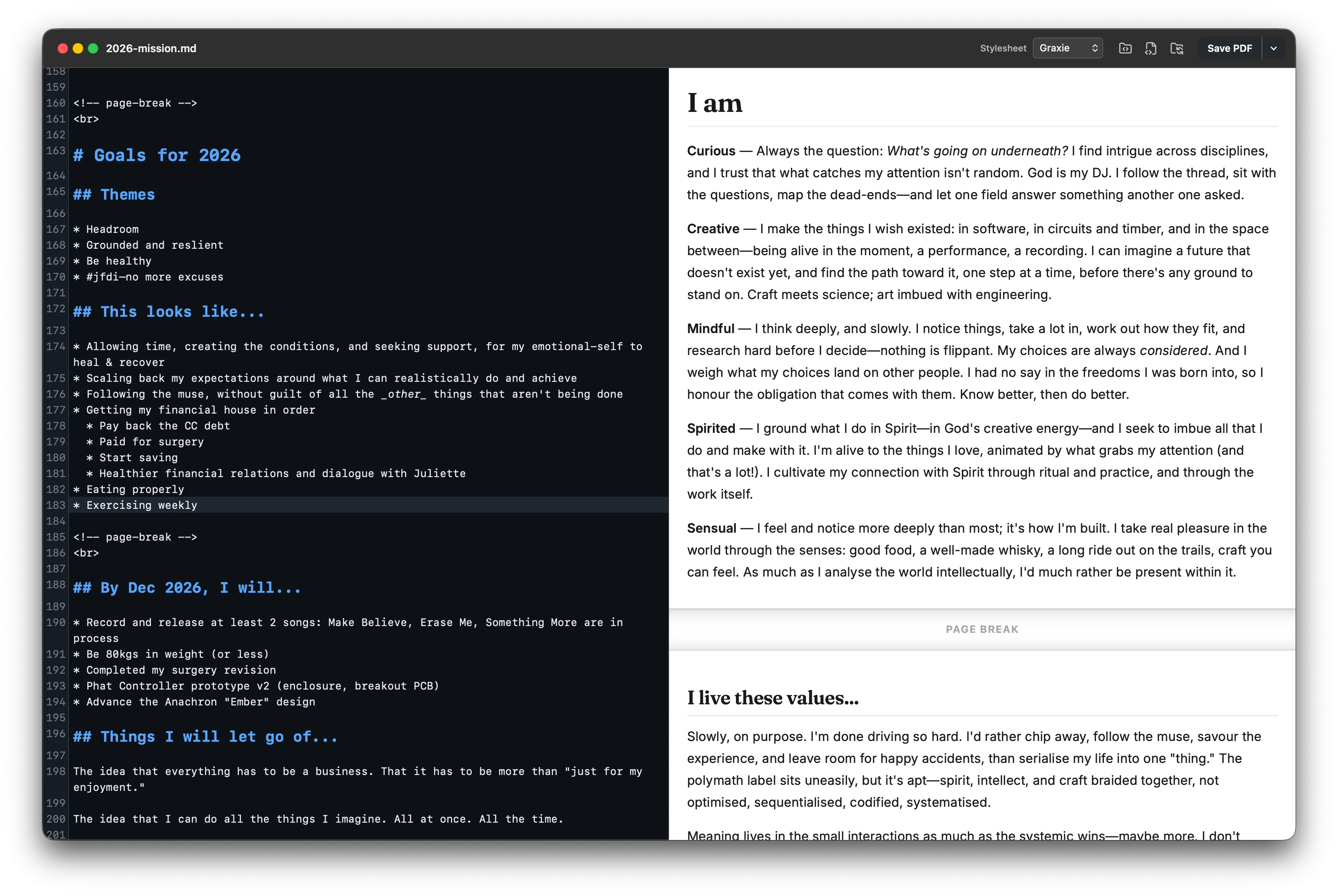
A small, native Mac app. You open or paste Markdown, you get a live preview next to it, and you export a PDF. The preview pane shows you what your document will actually look like—it’s not a WYSIWYG editor hiding the markup; you’re still looking at and editing real plain-text Markdown the whole time.
Styling is vanilla CSS. There are a few built-in stylesheets to start from, but the point is you can write your own—match your company’s brand for a report, pull in your personal site’s look for something you’re sending out under your own name, or just keep something clean and legible as a default.
Page breaks work the way I needed them to: automatic by default, with the ability to insert your own where the auto-pagination isn’t quite what you’re after.
Everything happens on your machine. There’s no cloud storage, no account, no “workspace”—your filesystem (or iCloud, or Dropbox, or wherever you already keep things) does that job—the app doesn’t try to build something else on top.
Why free, and why open source
There’s an old line about free software: if it’s free, you’re the product. I get why people are wary of that—too often it’s true. But it doesn’t apply here. I’m not monetizing usage, attention, or data, because I’m not trying to build a business around this. I already have what I needed.
I’m building this to solve my own problem and to learn (“Curious” is one of my core values, after all). Which means the app already exists for me whether or not anyone else ever uses it.
Releasing it free and open source would just be a way to share something I made for myself to have value beyond myself. If it turns out to be useful to even a handful of people who’ve hit the same wall I did, that’s enough to justify the polish. Being open source also means that anyone can audit it, and rebuild it on their own machine (rather than relying on a binary I ship), to verify the claim that “it’s all done on your machine”.
That said, the work of making it presentable enough to hand to other people—the installer, the documentation, actually explaining what it does instead of just knowing (because I built it)… That extra effort only makes sense if I have a strong sense that it would be useful to someone other than me. That this fills a real gap.
What’s next
I intend to keep knocking off some rough edges and refining it, informed by my day-to-day usage. If/when it’s in a state worth releasing, I’ll share some more here.
Knowing that someone else might benefit would be it’s own reward, and the incentive I need to take this further than just a personal project.
So, if you’ve felt the same gap—wanting something this specific and this small, and finding everything else either too much or not quite yours to trust—I’d love to hear about it.