As I noted in an earlier post, I’m wanting to move away from Cursor IDE, and I’m trialing Zed Editor with OpenRouter.
I’m a few days in, and wanted to share some impressions…
Zed still needs some work
As one might expect from a version 1.0 release, Zed is still not quite “solid” in my experience—mostly around the AI features. Two particular issues I’d highlight:
- You can’t paste an image directly in the chat window. My general pattern is to screenshot a visual issue and provide that to the agent for review. I use CleanShot to create my screenshots, which allows me to put these in the clipboard. When I paste this into the chat window, the agent can’t access the file. My (fiddly) workaround is to paste it into a temp directory in my project, and drag that file into the chat window. Hoping that’s a common-enough issue for people that it will be fixed at some point.
- Agents fail to access tools far too often. They’ll try to find a file, and get no response. They’ll try to edit a file, and get an ‘index’ error (which usually means the file has changed in the background). They’ll try to edit a file, and it will just fail. They’ll get into loops where the tooling is returning no response. This chews up a tonne of time having to stop, restart, the process, sometimes migrate to another agent window to get it to work.
OpenRouter
Model choice has its drawbacks. Price pass-through has its drawbacks.
- I don’t know which models are any good, nor what I should try. I have no idea how much they will cost. Some go in infinite loops of thinking and… wait I need to think of this from a… wait, I think I’ve got this wro… hang on, I think I might need to take a different approach. These models are sometimes super cheap per token, but extremely inefficient. Others are massively too expensive (see next point). Some are in between (inefficient and expensive, or efficient and reasonably priced). But… I have no idea what sort of combination is what.
- I’ve blown through a month’s budget just trying a few things out. And one of those was from one stray Opus session, where the full cost was passed through and cost $25 before I could even blink! I’m annoyed, but racking this up to “learning”. It’s now clear to me how much model makers like Anthropic, and investment-backed tools like Cursor, are subsidising the market.
- Unclear features, inconsistent interfaces. It’s really hard to tell which models can take in visual inputs or not. Some fail with cryptic errors that are pointing to inconsistencies in prompting templates etc. So much trial and error.
While there’s some “comparison” options on OpenRouter, but they don’t really tell the whole story. For features. For quality. For verbosity vs. efficiency. And how all of that plays into costs.
I’ve tried Kimi 2.7, GLM5.2, Qwen 3.6 Plus, Qwen Coder Next, MiniMax M3… And I still don’t have a sense of any of them being particularly strong.
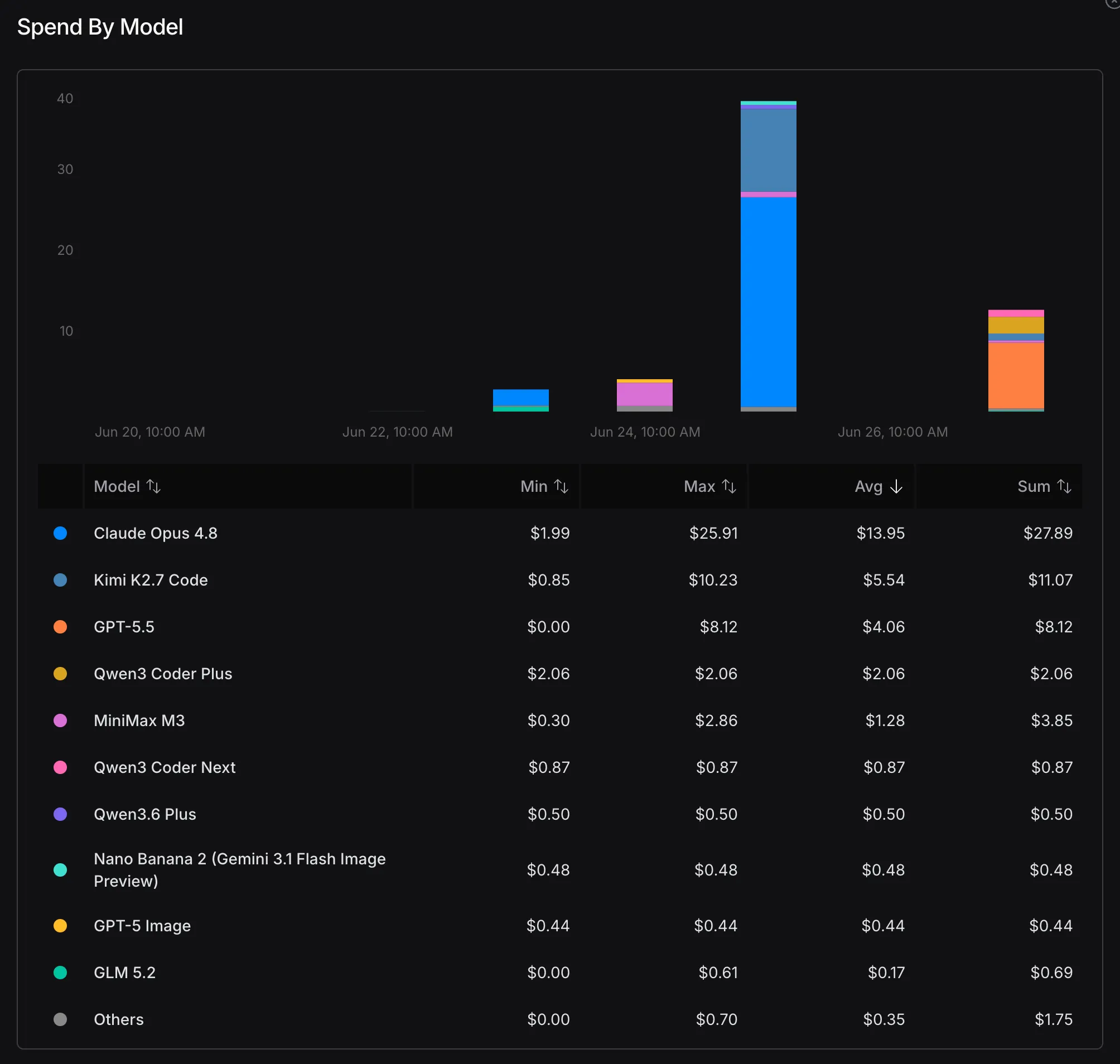
Using Opus just once was a killer for the monthly budget
(Note that in that cost chart, the image models were me trying out some options as alternatives to Midjourney.)
I used Opus for a text-based thing—writing a README or a Markdown guide, IIRC. It was a relatively small task. And it chewed up nearly $25. A whole month’s typical spend for me, in Cursor. Thus, I learnt quickly that the best option, if you have a Claude account, is to set up the dedicated ACP option for Claude, and connect that to Zed. Let Anthropic wear the risk! Their standard allowances and limits are far more forgiving than the straight “token cost” pass through from OpenRouter.
I had one reasonably productive session today with Qwen 3 Coder Next. But, honestly, whilever I’m “in budget” on my Claude account, I’ll simply keep reverting to that, based on experience so far. Sonnet 4.6 (Medium) seems to do the best “bang for buck” job.
So, I would venture the learning, so far, is:
- Claude models are unforgiving in OpenRouter—don’t go near there
- The rest is a bit of a crap-shoot
- Stick with Claude, but using Anthropic’s default allowances
Local models with LM Studio
As part of my experimentation, I have also tried a few local models, using LM Studio.
My personal machine is an M4 MacBook Air with 24GB RAM (I have a MacBook Pro for work purposes). Again, as one might expect, it is nowhere near powerful enough to do anything remotely productive using local LLMs, despite what YouTuber after YouTuber is claiming.
So far, I’ve tried:
- Gemma 4 12B
- Qwen 3 (can’t remember the exact details)
- Ornith 9B
- Gemma 4 “Coder” (the fable/composer trained version)
Gemma 4 “Coder” didn’t work with Zed—and was still extremely slow in LM Studio itself.
Gemma 4 12B was waaaaayyyyy slow.
Ornith is promising, but still way too slow and limited locally. Even for doing something simple like creating a skill/script to clean up Apple iCloud’s stupid " 2.*" files was a 10+ minute exercise. Doing this with Claude Sonnet in the cloud is seconds (less than a minute, at worst). Or when I asked it to process a SKILL for creating a new Markdown document, I gave up after 3 minutes (I literally can do the tasks manually in <60s).
I’m very keen to try out one of the larger parameter variants of this model in the cloud—as it IS the “best of the bunch” I’ve tried, so far. But, yeh… that’s still a long way from “usable.”
Key learning: local LLMs are still, at this point, for those that can afford the very hefty hardware investment of a dedicated GPU-driven environment.
I think it will be another generation (or two) of CPUs/GPUs/model evolution before local LLMs are feasible as a replacement for cloud-based solutions.
The upshot
- I think I’ll persevere with Zed
- I will default to Claude using the ACP in Zed (not OpenRouter)
- I might keep experimenting with some of the other models in OpenRouter, but for the moment, I’m going to save my bikkies, and effort, unless I quotas in Claude